


Introduction
The dbLinter clients include a new setting named Allow Insecure TLS. It is disabled by default. As a result, all REST API calls verify the TLS certificate and hostname.
The setting allows dbLinter to work in organisations that inspect TLS traffic using tools such as Zscaler.
In larger organisations, arranging an inspection bypass can be cumbersome and is often too much effort for an ad-hoc trial of dbLinter. The checkbox provides a temporary workaround and should be enabled only on a trusted network.
However, allowing insecure TLS on untrusted networks, such as open Wi-Fi without client isolation, can let an attacker redirect traffic through their own machine using techniques like ARP spoofing. The attacker can also operate the access point themselves, for example, by creating a rogue Wi-Fi hotspot.
In this blog post, I demonstrate the effect of this checkbox.
Allow Insecure TLS
The latest version of dbLinter for VS Code has a checkbox that disables certificate and hostname verification.
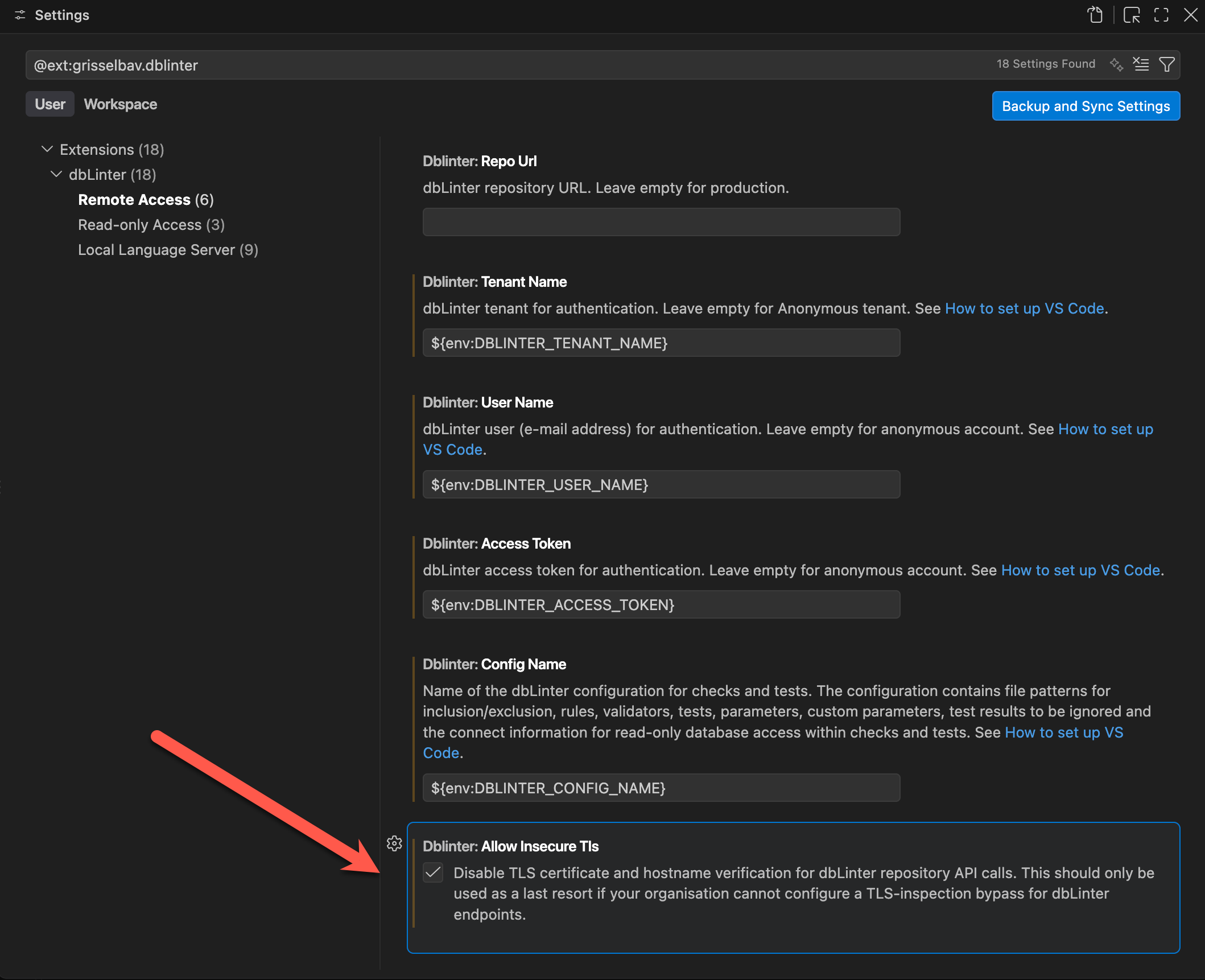
dbLinter’s allowInsecureTls setting is nothing unusual. Many common tools offer a similar option, including curl (--insecure), wget (--no-check-certificate), and git (--config http.sslVerify false).
Installing and Configuring a Proxy
I run this demo on macOS 26.6.2.
A simple proxy is mitmweb. We can install and configure it as follows:
brew install mitmproxy
networksetup -setsecurewebproxy "Wi-Fi" 127.0.0.1 8090
mitmweb --listen-port 8090 --web-port 8091 --allow-hosts '^api\.dblinter\.app'[20:36:20.907] HTTP(S) proxy listening at *:8090.
[20:36:20.908] Web server listening at http://127.0.0.1:8091/?token=f83b02032aaaccd282ad3925a484fcdbThe mitmweb command starts the proxy and listens on port 8090 for TLS traffic between localhost and api.dblinter.app. All other traffic is bypassed.
The mitmweb proxy also opens the following web page:

Intercepting Traffic
To generate traffic, we launch VS Code and open a SQL file. This produces the following in the output panel for dbLinter:
2026-08-23 20:37:43.216 [Info ] Starting dbLinter Language Server.
2026-08-23 20:37:43.539 [Info ] connect.
2026-08-23 20:37:43.611 [Info ] initialize VSCode 1.10.0.
2026-08-23 20:37:43.646 [Info ] didOpen file:///.../dbl_client_types.sql.
2026-08-23 20:37:43.651 [Info ] AntlrCacheCoordinator initialized with parallel degree 1 and clearCacheThreshold 2048 of 16384 MB.
2026-08-23 20:37:43.671 [Warn ] TLS certificate and hostname verification are disabled for dbLinter repository API calls. Use this temporary workaround only when TLS interception cannot be bypassed.
2026-08-23 20:37:45.533 [Info ] Configuration dbLinter of tenant Grisselbav loaded with 294 check methods.
2026-08-23 20:37:45.534 [Info ] didChangeConfiguration.
2026-08-23 20:37:45.703 [Info ] tests returned 43 tests.
2026-08-23 20:37:45.796 [Info ] parseAndCheck file:///.../dbl_client_types.sql.
2026-08-23 20:37:45.910 [Info ] hasFeature Config returned true.
2026-08-23 20:37:46.286 [Info ] parseAndCheck completed in 0.489 sec including 0.052 sec for checks.
2026-08-23 20:37:46.289 [Info ] diagnostics for file:///.../dbl_client_types.sql with 2 issues.The log contains a warning that TLS certificate and hostname verification are disabled.
dbLinter analyses SQL and APEXlang files locally. The captured traffic lets us verify what is sent to the dbLinter API. It contains the API key and session data, but not the contents of the analysed files. The source code therefore remains within the local network.
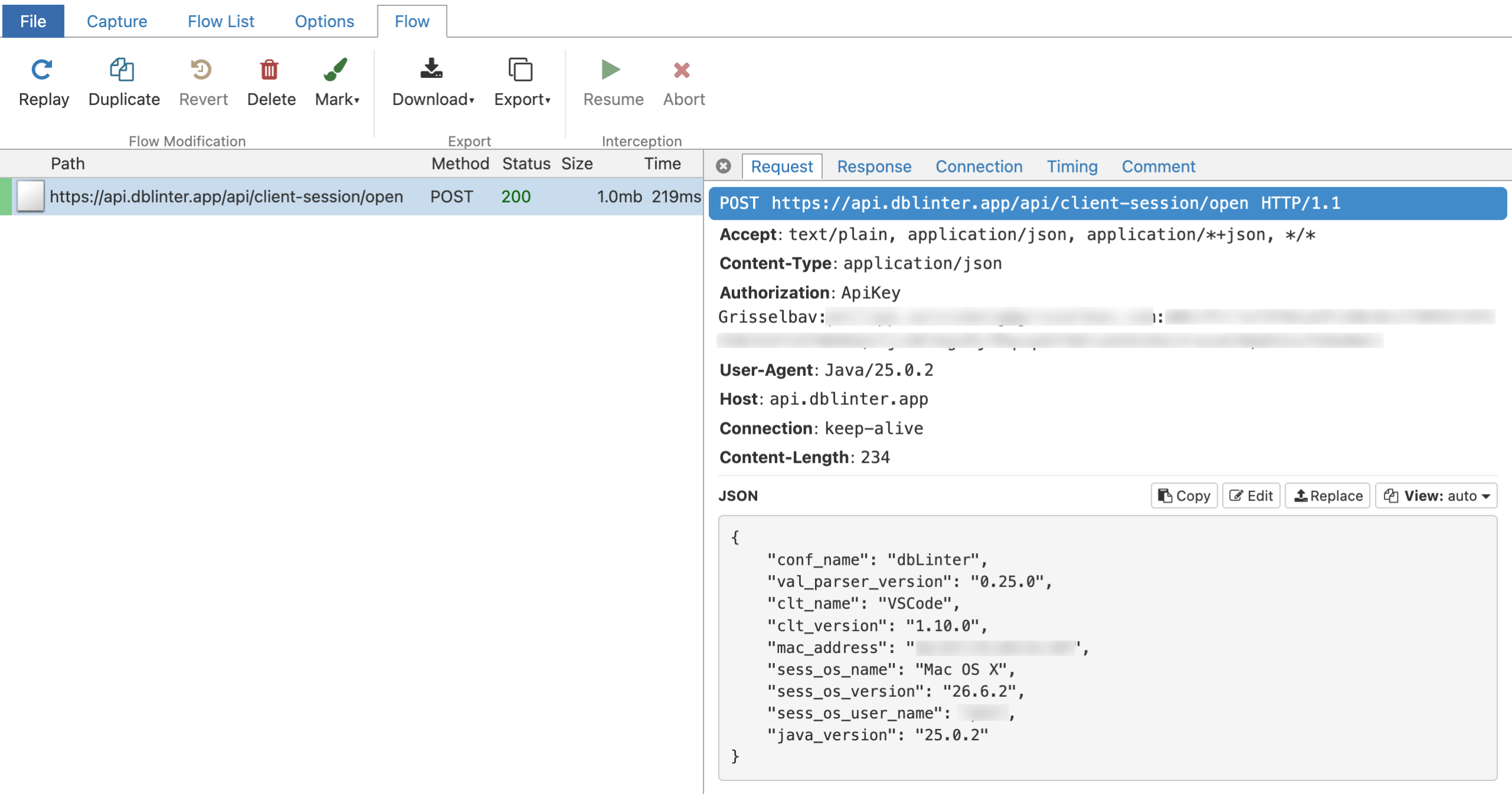
It goes without saying that it is not good to expose the API key in plain text.
The proxy also shows the decrypted response:
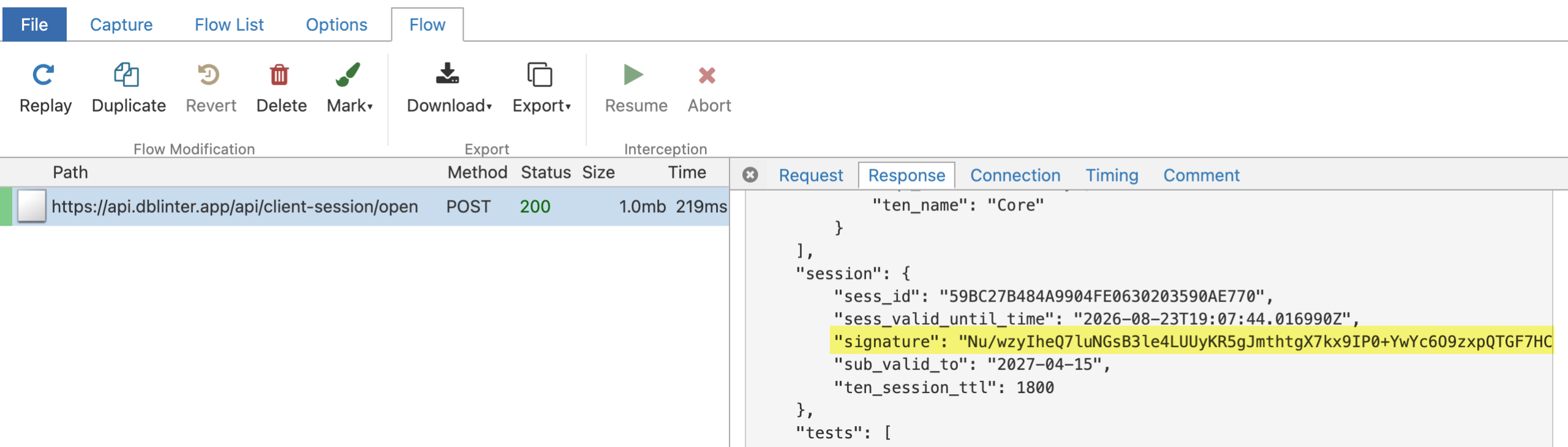
The session object in the response contains a signature. The client can therefore detect changes to the signed content, including the validators. This prevents the proxy from silently modifying the validators or injecting malicious code. However, the signature does not prevent the proxy from reading the request and response.
Enforce TLS Verification
Now let’s uncheck the Allow Insecure TLS checkbox and execute the Reload Window command.

This produces the following in the output panel for dbLinter:
2026-08-23 20:52:37.281 [Info ] Starting dbLinter Language Server.
2026-08-23 20:52:37.550 [Info ] connect.
2026-08-23 20:52:37.606 [Info ] initialize VSCode 1.10.0.
2026-08-23 20:52:38.047 [Info ] didOpen file:///.../dbl_client_types.sql.
2026-08-23 20:52:38.049 [Info ] AntlrCacheCoordinator initialized with parallel degree 1 and clearCacheThreshold 2048 of 16384 MB.
2026-08-23 20:52:38.375 [Error] Failed to load configuration.

org.springframework.web.client.ResourceAccessException: I/O error on POST request for "https://api.dblinter.app/api/client-session/open": (certificate_unknown) PKIX path building failed: sun.security.provider.certpath.SunCertPathBuilderException: unable to find valid certification path to requested targetThe proxy presented a certificate for api.dblinter.app which was not issued by a trusted certification authority.
The proxy console therefore shows the following log entry:
[20:52:38.217][127.0.0.1:60439] server connect api.dblinter.app:443 (91.98.90.2:443)
[20:52:38.360][127.0.0.1:60441] client connect
[20:52:38.375][127.0.0.1:60439] Client TLS handshake failed. The client does not trust the proxy's certificate for api.dblinter.app (OpenSSL Error([('SSL routines', '', 'ssl/tls alert certificate unknown')]))
[20:52:38.377][127.0.0.1:60439] client disconnect
[20:52:38.380][127.0.0.1:60439] server disconnect api.dblinter.app:443 (91.98.90.2:443)The REST API call failed before the proxy received the HTTP request. Therefore, the API key and other request data were not exposed.
Reset Network Configuration and Uninstall Proxy
Let’s stop the proxy by pressing Ctrl-C in the terminal window running it. Then run the following:
networksetup -setsecurewebproxystate "Wi-Fi" off
brew uninstall mitmproxy
rm -rf ~/.mitmproxyConclusion
The Allow Insecure TLS option solves a practical problem in environments where TLS inspection cannot easily be bypassed. However, it disables certificate and hostname verification. A proxy or an attacker controlling the network can then read requests, including the API key.
The captured traffic also confirms that dbLinter analyses SQL and APEXlang files locally. Signed server responses protect the downloaded configuration from manipulation, but they do not protect confidential request data.
Therefore, enable this option only as a temporary workaround on a trusted network. The preferred solution is to configure a TLS inspection bypass. Disable the option again as soon as possible.