
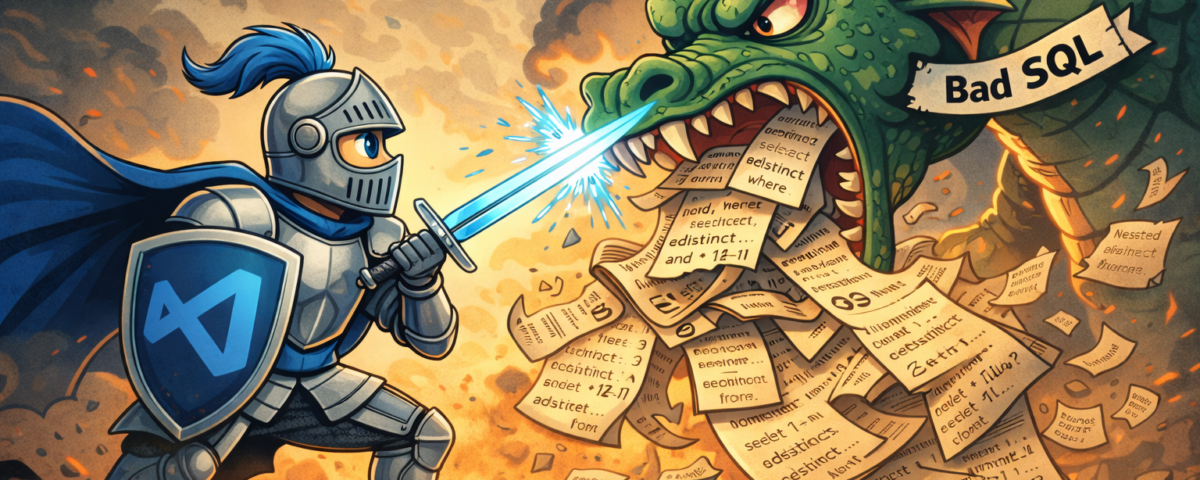
The success of a project or product depends largely on the quality of the code. But how can I improve security, maintainability or performance? More importantly, how can I prevent code with quality defects from entering production? In addition to testing, code analysis plays a central role. These days, code can be checked not only in CI/CD pipelines, but also during development. Modern IDEs, such as Visual Studio Code, can automatically detect quality issues and offer quick fixes. The goal is a fast feedback loop.
This blog post is based on my German article with the same title, published in issue 1/2026 of the Red Stack Magazin.
Measuring Software Quality
Imagine you are part of a team where code changes to a feature or bug fix branch are only merged into the develop or main branch following a review. Sometimes you are the author and sometimes one of the reviewers. I am currently part of a team that works in this way. In addition to quality assurance, knowledge sharing is also an important aspect. But how can we assess code quality?

This well-known meme by Thom Holwerda says, “The only valid measurement of code quality is WTFs per minute.” This seems to be a good metric. However, this metric does have some flaws.
- It is subjective.
- It does not provide any information about what is being assessed.
- It does not help new team members to adapt quickly.
- And it cannot be automated in a meaningful way.
Sooner or later, a team has no choice but to agree on a set of rules. They can be informal or formal. Typical coding guidelines cover topics such as naming conventions, formatting, code complexity, and language usage rules. The aim is to define and comply with quality standards relating to maintainability, reliability, performance and security. Written coding guidelines also simplify the onboarding of new team members.
Automation
Manually checking compliance with coding guidelines as part of a review is so time-consuming that no one can afford to do it properly. Therefore, we have to automate as many checks as possible. This is possible for many aspects. The rest still have to be checked manually.
In other words, we need a tool suite for automatic rule checking. dbLinter is such a tool suite. It is a new product developed and continuously improved by Grisselbav and United Codes. dbLinter uses the IslandSQL parser, which is updated quarterly with every release update of the Oracle AI Database for SQL, PL/SQL, SQL*Plus and SQLcl.
dbLinter is the successor to the decommissioned db* CODECOP suite. dbLinter consists of a central repository, a web GUI and client tools. These include a CLI, a SonarQube plugin and a VS Code extension.
Visual Studio Code Extension
The VS Code extension is compatible with all IDEs that implement the Visual Studio Code Extension API. Specifically: Visual Studio Code, Theia IDE, VSCodium, Cursor, Windsurf, Void, Kiro and Antigravity.
dbLinter for VS Code is available in both the Visual Studio Marketplace and the Open VSX Registry. Therefore, it can be conveniently installed directly from the IDE. The extension is free to use as part of the Anonymous and Starter plans (see dbLinter Pricing Plans).
It is important to note that your code is always analysed locally, meaning that it never leaves your network. The configuration is read from the central repository, enabling the client to identify the active rules and parameters. These configurations, along with others, are managed using the Web GUI.
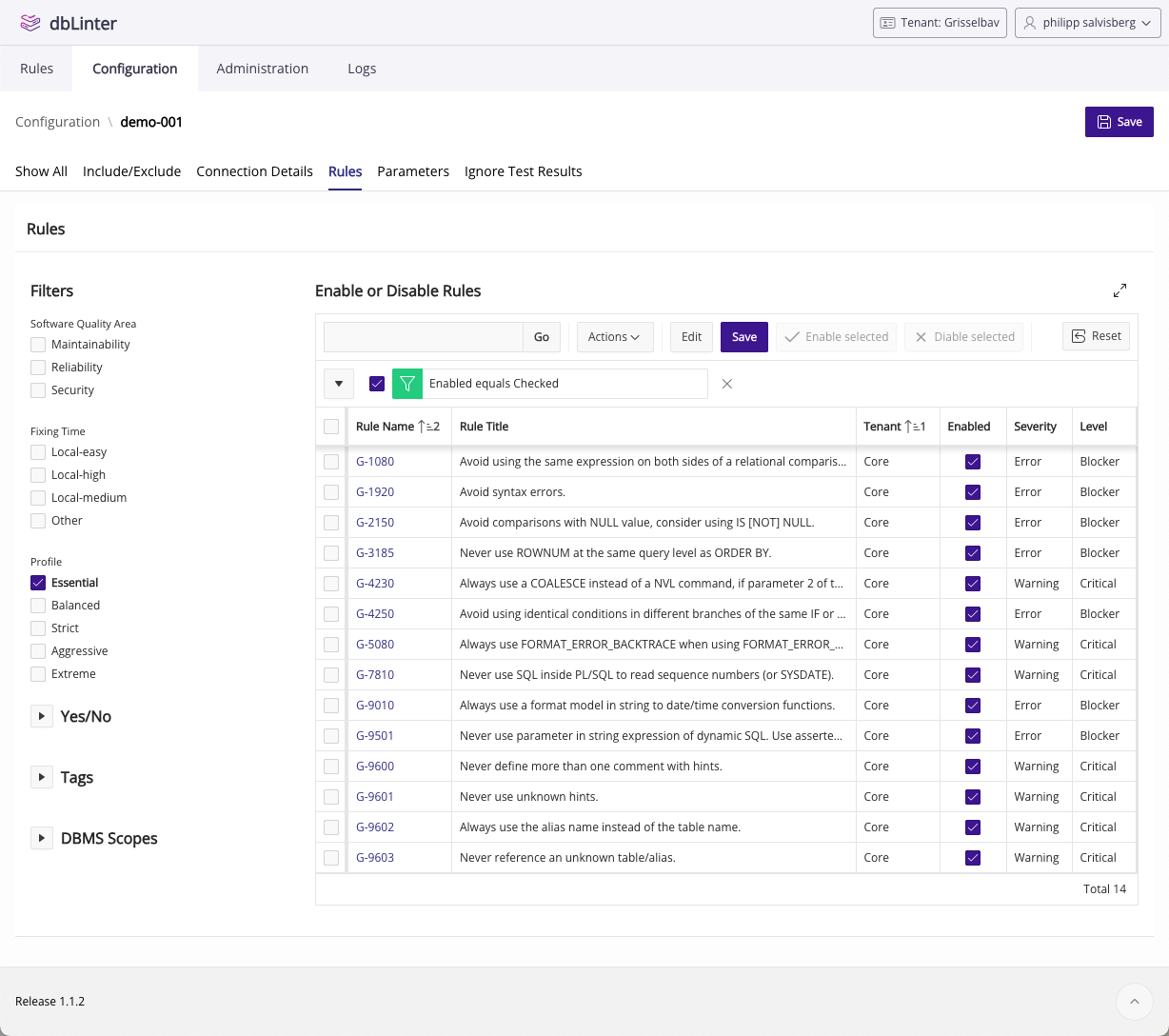
dbLinter currently offers 187 rules. This includes all the rules from the decommissioned Trivadis PL/SQL & SQL Coding Guidelines. Figure 2 shows the configuration of my 14 favourite rules. A violation of one of these rules is a bug. There is almost no room for interpretation here. The following chapters provide two examples.
Top-N Queries with ROWNUM
The query in Listing 1 is based on the well-known EMP table owned by the database user SCOTT. It returns two rows.
select ename,
       sal,
       hiredate,
       rownum as rank
  from emp
 where rownum <= 2
order by sal desc;ENAME SAL HIREDATE RANK
---------- ---------- ---------- ----------
ALLEN 1600 20.02.1981 2
SMITH 800 17.12.1980 1However, the result barely meets the requirements. I would have expected the two employees with the highest salaries to be returned. Why is this not the case? The query is formulated in such a way that two rows are randomly selected and then sorted in descending order by salary. The result depends on the execution plan and the physical storage of the data.
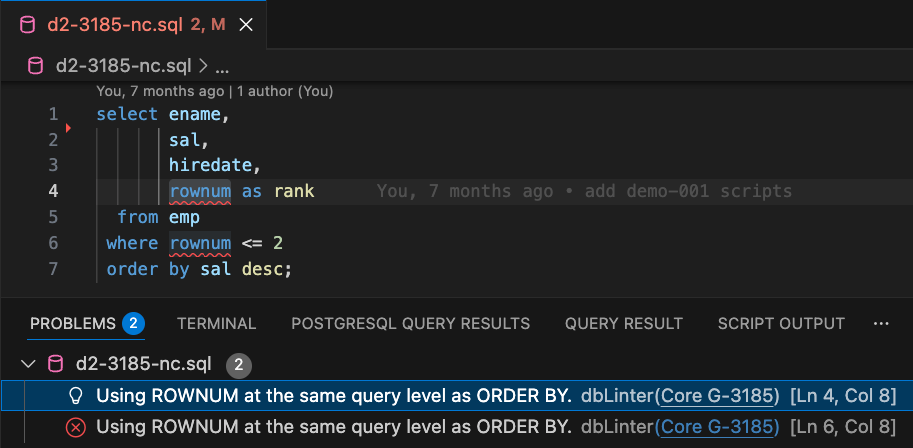
In VS Code, rule violations are displayed under Problems (see Figure 3). There is also a Core G-3185 link that opens the rule details in the Web GUI.
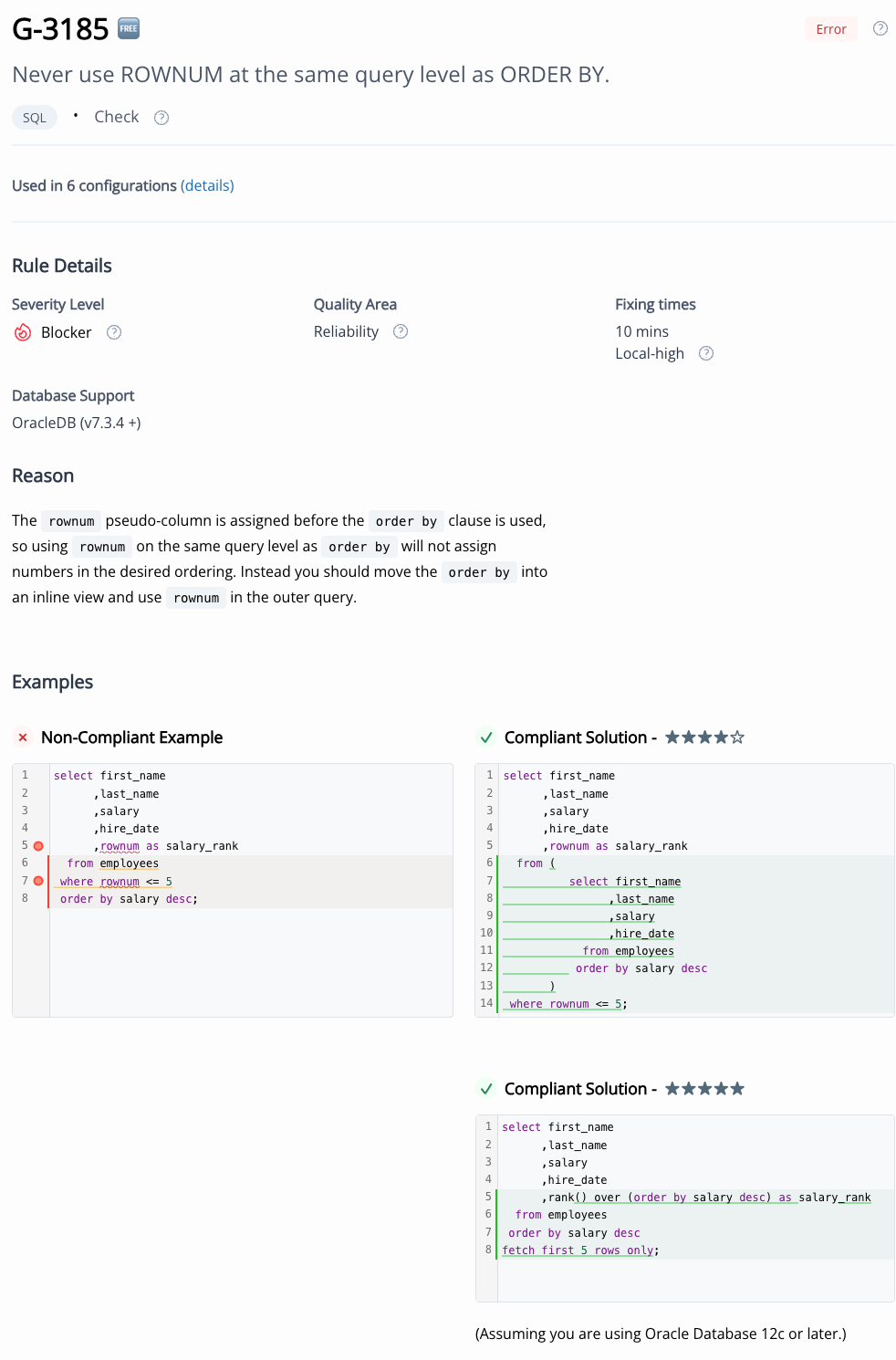
Rule G-3185 in the web GUI is explained based on a similar case in the HR schema (see Figure 4). There are two solutions here. One that can be applied in all Oracle Database versions and one that works from version 12c onwards. Listing 2 shows the traditional solution, which uses an inline view. Of course, nowadays I would always prefer a solution using the row_limiting_clause.
We can also see that the rule is used in six configurations. Clicking on “(details)” opens a pop-up window in which changes can be made. This allows you to configure the rules directly from the IDE.
select e.*,
       rownum as rank
  from (
          select ename,
                 sal,
                 hiredate
            from emp
           order by sal desc
       ) e
where rownum <= 2;ENAME SAL HIREDATE RANK
---------- ---------- ---------- ----------
KING 5000 17.11.1981 1
SCOTT 3000 19.04.1987 2NVL vs. COALESCE
One often underestimated rule is “G-4230: Always use a COALESCE instead of a NVL command, if parameter 2 of the NVL function is a function call or a SELECT statement”. This rule is about performance, which is relevant to all of us, especially when it is poor. This is why this rule is important.
with
   function slow_function return integer is
   begin
      sys.dbms_session.sleep(0.2);
      return null;
   end slow_function;
select ename, nvl(mgr, slow_function()) as mgr
from emp;Listing 3 demonstrates a case in which the use of NVL results in an execution time of approximately 2.8 seconds. If COALESCE is used instead of NVL, the execution time is only about 0.2 seconds. The reason is that NVL always evaluates the second parameter, even if the first parameter is not null. COALESCE works differently: the second parameter is only evaluated if the first parameter is null. This performance difference originates from the fact that the EMP table contains 14 rows, but only one of these returns an empty MGR.
In this case, using COALESCE is definitely the better solution. So, should NVL always be replaced by COALESCE? No. There are two special cases:
- NVL supports implicit data type conversion.
select nvl(mgr, '1') from empworks, butselect coalesce(mgr, '1') from empcauses an ORA-00932 error. However, implicit type conversions should be avoided anyway. The code should be adjusted accordingly. - Optimisations of
NVLcan lead to better execution plans.
Such optimisations currently only exist forNVLand not forCOALESCE. Therefore, it is better to continue usingNVLin these cases. See The Magical NVL Function by Monika Lewandowska for an example.
Quick Fixes
dbLinter knows these special cases. It offers appropriate alternative solutions. See Figure 5.
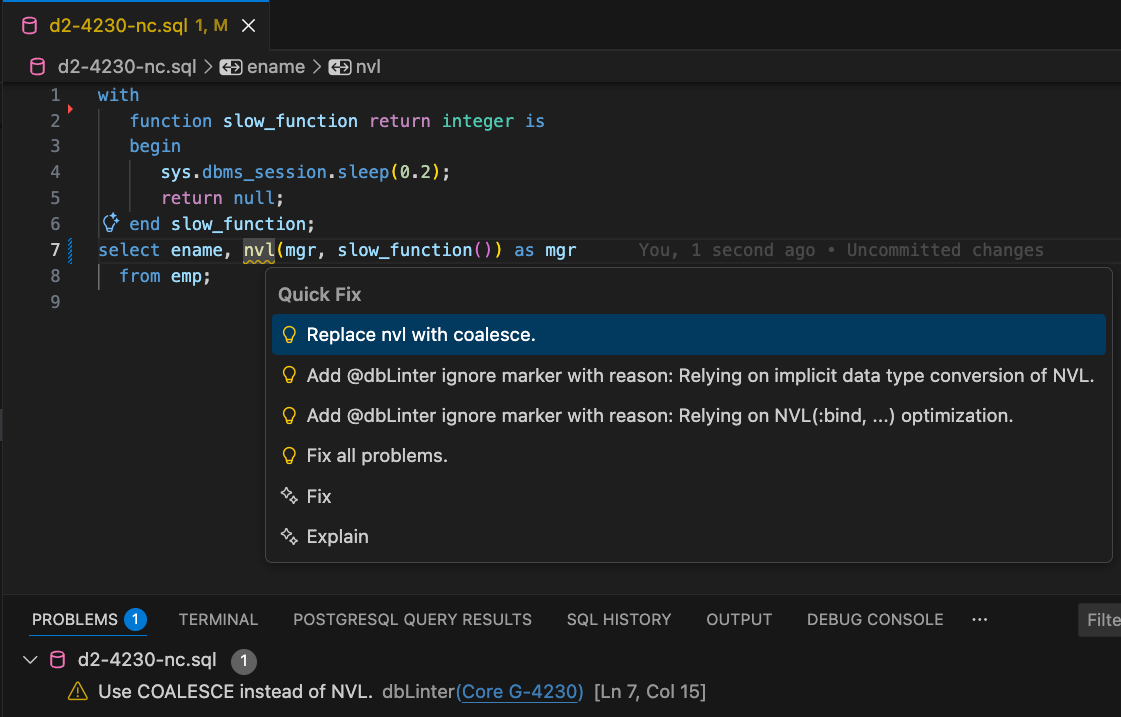
dbLinter can apply quick fixes to different sections. For example, for a single violation of a rule, for all violations of a rule, or for all violations of all rules in the editor window.
The “@dbLinter ignore markers” are special comments used to ignore rule violations. There are various legitimate reasons for doing this. For example, in the case of false positives (dbLinter bugs) or exceptions to the rule. A comment such as -- @dbLinter ignore(G-4230): NVL forever can have the following scopes: line, statement or file, depending on where the comment is positioned.
Code Analysis and AI
The solution proposals in Figure 5, indicated by the yellow lamp symbol, are quick fixes from dbLinter. However, the last two menu options come from GitHub Copilot.
When Copilot suggests a solution to a rule violation, dbLinter provides the necessary context, including the file and the exact location of the violation, as well as the name of the violated rule. This gives Copilot access to the rule definition online, enabling it to suggest a reasonable solution in many cases. In other words, dbLinter enhances the support offered by tools such as Copilot, Cline and Windsurf.
Rules are useful for AI tools. They provide a framework that leads to better results. However, there is no guarantee that all rules will be followed. Ultimately, code generated or expanded by AI becomes part of our code base. This is why it is important to check AI-generated code according to the same rules as manually created code.
In other words, AI does not enforce standards. But dbLinter can do that.
Conclusion
Software quality is a matter of definition. dbLinter offers many rules. Not all of them are useful and applicable to every project. The dbLinter rules can therefore be seen as a large buffet. You choose what you like and what is healthy. But not too much at once. Nevertheless, there are some rules that, in my opinion, should be followed in every project. I have presented two of them in this blog post.
Install dbLinter for VS Code to identify the rules that will be most helpful for your projects. The rules in Figure 2 are certainly a good starting point.
If you have any questions, please feel free to contact me. Alternatively, you can create issues directly in the dbLinter GitHub repository.