
Introduction
A parser for the APEXlang grammar enables the development of tools beyond the scope of the APEXlang compiler included in SQLcl, SQL Developer for VS Code, and ORDS. These tools can perform static code analysis, convert code, generate documentation, and visualise different aspects of an APEX application.
A linter, for example, can check whether an APEXlang file conforms to defined quality standards. These standards may cover project- or company-specific conventions as well as more general concerns, such as detecting potential security vulnerabilities.
In this blog post, I explain the elements of an APEXlang file that are the basis of Grisselbav’s APEXlang parser. Then I demonstrate how to use the parser in a simple Java program to detect a security vulnerability.
Elements of an APEXlang File
An APEXlang file consists of three basic building blocks: components, properties, and groups. These elements can also be nested, as shown later.
Here’s an excerpt of Oracle’s Universal Theme demo application.apx file:
app UT (
    name: Universal Theme 26.1 Reference
    version: 26.1.0
    group: @universal-theme
    logo {
        type: text
        text: Universal Theme
    }
    // ...removed code...
)Component
There is one component in this example. It starts on line 1 and ends on line 10. app is the type of the component and UT the component name.
A component body starts with a left parenthesis ( and ends with a right parenthesis ).
Property
In this example, we have 5 properties. The property keys are name, version, group, type and text. The value of a property follows a colon :. For name The value is Universal Theme 26.1 Reference, for version the value is 26.1.0 and so on.
Please note that a property starts on a new line, and the property value starts after the colon and ends on a new line. This way, no delimiter characters are required for most property values. However, if leading or trailing spaces are significant, you have to pass the property value as a single-line string, which is enclosed in double quotes.
Group (of properties)
The properties type and text are part of a group named logo. The group in this example covers lines 5 to 8.
A group body starts with an open curly bracket { and ends with a close curly bracket }.
Properties which are not part of a group are called direct properties. This means they are defined directly in a component. Examples of direct properties are name, version and group.
Nested Elements
We have seen that a component may contain properties and groups. But it is also possible to nest elements.
- Components may contain other components besides properties and groups
- Property values may contain groups besides simple values
There is no limit to the number of levels for nested elements.
Here’s an example:
app UT (
    // ...removed code...
    pwaShortcut getting-started (
        name: Getting Started
        sequence: 10
        shortcut {
            target: {
                page: 500
            }
            description: Getting Started Page - Initial Page
        }
        comments {
            comments: -
        }
    )
   // ...removed code...
)A nested component starts on line 3 and a nested group on line 7.
APEXlang Grammar

While the grammar documented in apexlang. ebnf of the API Reference defines both the language structure and the valid APEXlang elements, the grammar used by Grisselbav’s APEXlang parser is limited to structural concerns.
Because the parser focuses solely on syntax rather than semantic validation, the grammar remains remarkably compact.
Click on the image above to view all the syntax diagrams. Alternatively, view the ANTLR4 source files, ApexLangLexer.g4 and ApexLangParser.g4, which were used to generate the parser available on Maven Central.
APEX-SERT
APEX-SERT is an APEX application that scans a selected APEX application for security vulnerabilities. A vulnerability is detected by querying APEX dictionary views. All rules are defined in the APEX-SERT Rules.json file.
To demonstrate a practical use case, let’s look at the security check “Embed in Frames” implemented by APEX-SERT.
When the property “Embed in Frames” is set to Allow, the application may be vulnerable to “clickjacking” attacks as explained in the help text of the page designer. See screenshot below.
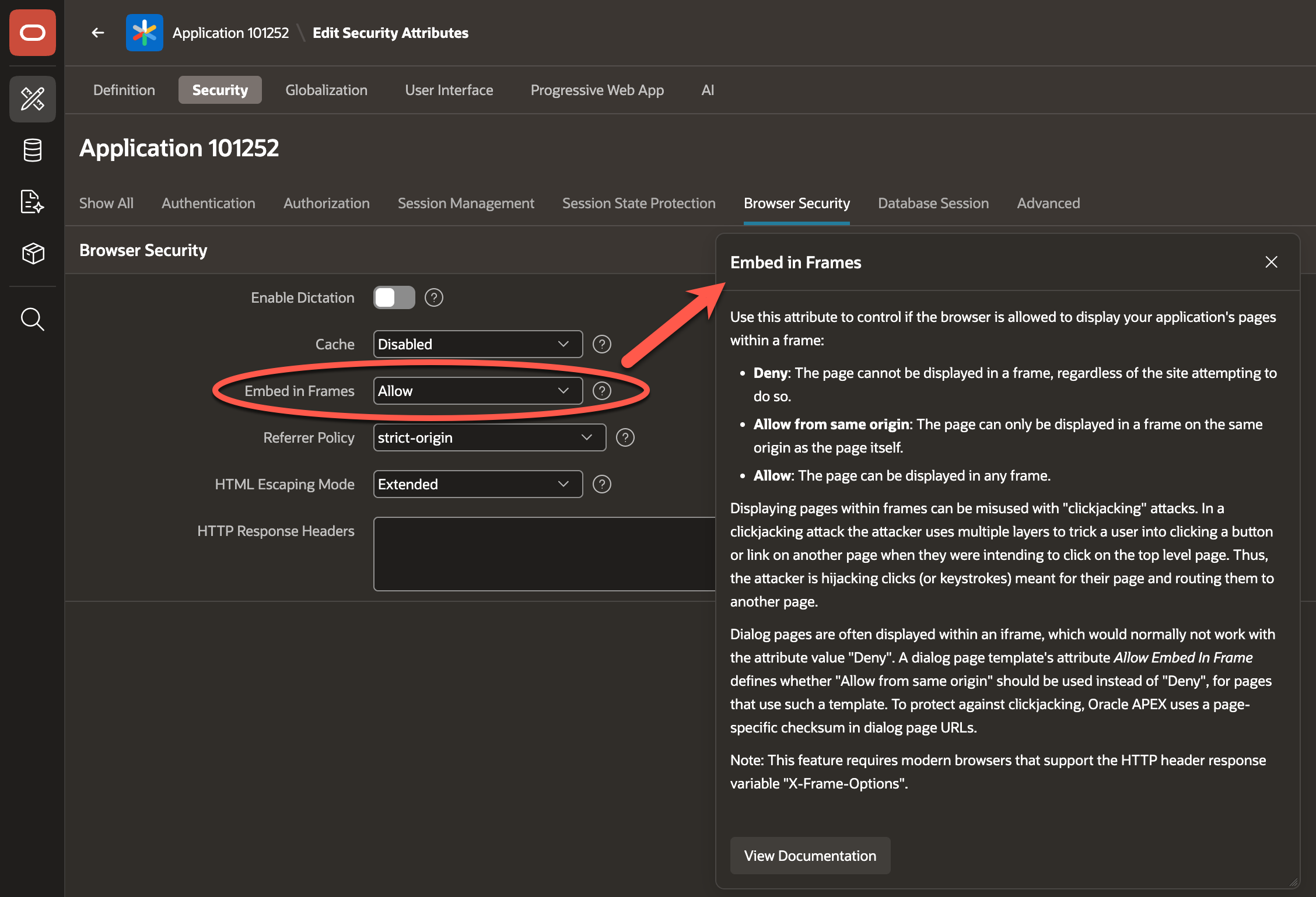
I changed the original value from Allow from same origin to Allow to simulate a security vulnerability.
APEX-SERT runs a query similar to the following to find violations of this rule:
select application_id, application_name, browser_frame
  from apex_applications
where browser_frame not in ('Deny', 'Allow from same origin');APPLICATION_ID APPLICATION_NAME BROWSER_FRAME
-------------- ------------------------------ -------------
101252 Universal Theme 26.1 Reference AllowSo, the value of Embed in Frames is provided in the browser_frame column of the APEX dictionary view apex_applications.
But where can we find this information in the APEXlang files?
Link Page Designer Property to APEXlang
We find the “Embed in Frames” property in the page designer by navigating to “Shared Components” -> “Application Definition” -> “Security” -> “Browser Security”.
According to the apexlang. ebnf there is a security group within the app component. Here’s the relevant excerpt:
<app-security> ::= <indent> "security" <ws> "{" <line-end> { <app-security-property-line> } <indent> "}" <line-end>
<app-security-property-line> ::= <indent> <app-security-property> <line-end>
<app-security-property> ::= "deepLinking" ":" <ws> ( "true" | "false" ) (* required; type: SELECT LIST *)
  | "enableDictation" ":" <ws> <boolean> (* required; type: YES NO *)
  | "browserCache" ":" <ws> ( "true" | "false" ) (* required; type: SELECT LIST *)
  | "embedInFrames" ":" <ws> ( "deny" | "allowSameOrigin" | "allow" ) (* required; type: SELECT LIST *)
  | "referrerPolicy" ":" <ws> ( "noReferrer" | "noReferrerWhenDowngrade" | "origin" | "originWhenCrossOrigin" | "sameOrigin" | "strictOrigin" | "strictOriginWhenCrossOrigin" | "unsafeUrl" ) (* required; type: SELECT LIST *)
  | "htmlEscapingMode" ":" <ws> ( "basic" | "extended" ) (* required; type: SELECT LIST *)
  | "httpResponseHeaders" ":" <ws> <multiline-string> (* type: TEXT EDITOR *)
| "runtimeApiUsage" ":" <ws> <array-of-string-like-value> (* type: CHECKBOXES *)We find on line 352 the definition of the property embedInFrames with a list of valid values. In this case, the property key is unique. This means that no other component or group uses the property key embedInFrames. Therefore, we can search the folder containing the .apx files for the string embedInFrames: to find the position of this property.
The matching property is located in the application.apx file.
Here’s an excerpt.
    authorization {
        runOnPublicPages: true
    }
    security {
        deepLinking: true
        embedInFrames: allow
        runtimeApiUsage: modifyThisApp
    }
    sessionStateProtection {
        allowUrlsCreatedAfter: 1999-08-04T00:00:00
        checksumSalt: 75BAAC4002F8CA56EF54FD242CCE7719B1AB85BE339E930260B3EC8EA3879365
}Please note that properties with default values are skipped when an APEX application is exported. Therefore, we would not see the embedInFrames property if its value were Deny.
Find Vulnerability With APEXlang Parser
We now have all the information we need. We can write a small demo program. This program will find this vulnerability in an APEXlang file.
The parser exposes the parse tree through ANTLR4-generated context classes. Each parser rule becomes a context class. For example, the class ApexLangParser.PropertyContext represents the property parser rule. This makes it easy to traverse the ApexLangDocument using Java streams.
//DEPS com.grisselbav:apexlang-parser:0.2.0
import com.grisselbav.apexlang.grammar.*;
class DemoFindVulnerability {
public static void main(String[] args) {
var apxSource = """
app UT (
name: Universal Theme 26.1 Reference
version: 26.1.0
// ... removed code ...
    authorization {
        runOnPublicPages: true
    }
    security {
        deepLinking: true
        embedInFrames: allow
        runtimeApiUsage: modifyThisApp
    }
    sessionStateProtection {
        allowUrlsCreatedAfter: 1999-08-04T00:00:00
        checksumSalt: 75BAAC4002F8CA56EF54FD242CCE7719B1AB85BE339E930260B3EC8EA3879365
    }
// ... removed code ...
)
""";
var doc = ApexLangDocument.parse(apxSource);
var violations = doc.getAllContentsOfType(ApexLangParser.PropertyContext.class)
.stream()
.filter(p -> p.name.getText().equals("embedInFrames")
&& p.value().getText().equals("allow"))
.toList();
for (var violation : violations) {
System.err.println("Found vulnerability: " + violation.getText());
}
}
}This program embeds the APEXlang source code to scan in the apxSource variable. To run the program, save it as DemoFindVulnerability.java, then run it with JBang. This will automatically resolve the Maven dependency on the first line.
jbang DemoFindVulnerability.java[jbang] Resolving dependencies...
[jbang] com.grisselbav:apexlang-parser:0.2.0
[jbang] Dependencies resolved
[jbang] Building jar for DemoFindVulnerability.java...
Found vulnerability:
embedInFrames: allowAre Regular Expressions An Alternative?
In this case, we could have used a regular expression to identify the violation.
However, as soon as the rules become more complicated, e.g. if we want to ensure that the property is part of the security group and the security group is part of the app component, regular expressions are no longer suited. But a parser is. Because we can navigate the parse tree and adjust the filter settings as follows.
//DEPS com.grisselbav:apexlang-parser:0.2.0

import com.grisselbav.apexlang.grammar.*;

class DemoFindVulnerability2 {
    public static void main(String[] args) {
        var apxSource = """
                app UT (
                    name: Universal Theme 26.1 Reference
                    version: 26.1.0
                    // ... removed code ...
                    authorization {
                        runOnPublicPages: true
                    }
                    security {
                        deepLinking: true
                        embedInFrames: allow
                        runtimeApiUsage: modifyThisApp
                    }
                    sessionStateProtection {
                        allowUrlsCreatedAfter: 1999-08-04T00:00:00
                        checksumSalt: 75BAAC4002F8CA56EF54FD242CCE7719B1AB85BE339E930260B3EC8EA3879365
                    }
                    // ... removed code ...
                )
                """;
        var doc = ApexLangDocument.parse(apxSource);
        var violations = doc.getAllContentsOfType(ApexLangParser.PropertyContext.class)
                .stream()
                .filter(p -> p.name.getText().equals("embedInFrames")
                        && p.value().getText().equals("allow")
                        && p.parent.parent instanceof ApexLangParser.GroupContext g
                        && g.name.getText().equals("security")
                        && g.parent.parent.parent instanceof ApexLangParser.ComponentContext c
                        && c.type.getText().equals("app"))
                .toList();
        for (var violation : violations) {
            System.err.println("Found vulnerability: " + violation.getText());
        }
    }
}Integration Into dbLinter
The APEX-SERT “Embed in Frames” rule has been added to the dbLinter repository as rule A-0770: Never allow application pages within an HTML frame. The VS Code extension, the CLI and the SonarQube plugin now support checks implemented for APEXlang.
Here’s a short silent video that demonstrates how this security vulnerability is detected and quickly fixed.
Conclusion
The APEXlang grammar is intentionally simple through focusing on structural elements, leaving semantic validation, such as valid property values, to the APEXlang compiler in SQLcl, SQL Developer and VS Code.
Integrating the APEXlang parser into dbLinter was straightforward, as was implementing the first APEXlang-based dbLinter rule.
The next step is to identify which additional rules would be beneficial to bring to dbLinter. If you have any suggestions, please let me know. Even better, open a GitHub issue in the dbLinter GitHub repository.
Thank you.
Updated on 2026-07-29, fixed link to rule “Never allow application pages within an HTML frame” (A-1010 → A-0770).